


Our Hard Drive Camcorder File Transfer Services
HARD DRIVE CAMCORDERS
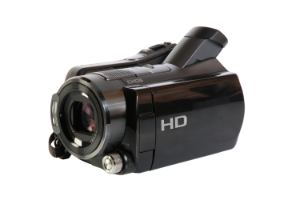
Don’t let your family memories become locked away on your hard drive camcorder. Many of us have treasured home videos stored on our HDD camcorder, but need a way to transfer video files from the camcorder to computer. Bring us your hard drive camcorder, and our service will find and move all of the files off your HDD camcorder to USB. Once your HDD camcorder videos are on USB, you can easily watch the videos from the drive, or download camcorder video to computer to edit and share.
Our hard drive camcorder transfer to computer services are designed to move files off your HDD camcorder efficiently. We safely connect your device to our dedicated transfer stations using the proper cables. Our trained staff will import the files and download all of your HDD camcorder videos to computer servers. We thoroughly check to ensure all files transfer completely, and then load them to a drive you provide (we also sell drives). This process ensures your files are safely stored and easy to backup, allowing you to enjoy your HDD camcorder memories and confidently clear your internal drive and SD card to make space for more recording.
Once we transfer video files from your HDD camcorder to a drive, you’ll have a world of options for easy viewing, sharing, uploading, editing, and archiving. Stop by any location to get started!
Move Files off Your Hard Drive Camcorder to USB at Memories to Digital
Read & copy files off internal hard drives and SD cards
Data transfer integrity checks
DV file conversion and editing options
A full HDD camcorder prevents you from recording new family moments, and leaves your treasured videos trapped on the device. At Memories to Digital, our goal is to free you up to enjoy your video memories and make new video memories, rather than trying to figure out how to move your data and convert the files to a watchable format. We handle the entire complex transfer, giving you modern, accessible files so you can clear your hard drive camcorder and get back to recording.
Additional Information
What’s Included When We Download HDD Camcorder Video
All HDD Camcorder data transfers include:
- Meeting with you to discuss the details of your project. If you’ve mailed your material, we’ll call you for details.
- Transferring your files to a new storage medium. This process includes:
- Reading and exploring each original storage medium you provide.
- Copying the data to your new storage medium.
- Creating a folder system on the new storage medium to account for and organize the data from each original source.
- Checking the integrity of the data transfers to verify that all files copied completely.
- Documenting any hardware, software or file system problems that prevent a complete data transfer.
- Advising you as to any conversion or editing options.
Your original storage media are returned to you with your finished project. All data migration is done by our professionally trained staff in our local lab.
Note: Data transfer is limited by the condition of your original media. Additional charges may apply for: cleaning, handling, troubleshooting, or repairing dirty, moldy, damaged, degraded, corrupted or otherwise untransferrable media or files ($120/hour, $19.95 minimum per media, $4.95/file). Drives sold separately.
Preparing for Hard Drive Camcorder File Transfer Services
- Find the cables and power cords for each of the HDD camcorders in your project. If you don’t have them, there is a good chance we will, but bringing the cords and cables specific to your camera will ensure a smooth transfer.
- Think about how many USB drives you’ll need. We recommend purchasing a second copy that can be stored separately for safekeeping.
- Consider subscribing to our local, secure, offline backup storage plan.
- Once your memories are backed up and easily accessible, read about all of the services we provide to help you watch, edit and share your digital video and your digital photos.
- Get started – pick a location to drop off your media and book an appointment, or simply stop by a location that accepts walk-ins.
Hard Drive Camcorder File Transfer Pricing
Storage Medium | Pricing |
Hard Drive Camcorders | $59.95/camcorder $29.95/camcorder with playable disc or file conversion order |
Minimum order: $29.95
Additional charges may apply for: cleaning, handling, troubleshooting, or repairing dirty, moldy, damaged, degraded, corrupted or otherwise untransferrable media or files ($120/hour, $19.95 minimum per media, $4.95/file). Drives sold separately. Connection cords and cables included if we have them already available in-house. Purchasing required cords and cables is a billable service and cost. Drives sold separately.
Why Choose Memories to Digital?
We Treat Your Memories as if They’re Our Own
We founded Memories to Digital in 2003 after our family mailed their family films away and they got lost. We wanted our community to have a local place to convert family memories, one that offered an alternative to faceless mail-away services.
Today, whether you visit a Memories to Digital location, a Memorywise location, or one of our local partner businesses to drop off or pick up, you receive the same great service from the same dedicated local team. We are your media digitization experts.
We do 100% of our work ourselves, in-house, locally. We give you and your memories the personal service, care and attention deserved, and we use the latest technology to provide you with high-quality digital memories.
Safe, Secure, and Nearby
Eliminate the worry of mailing your memories. We’re local, we do all of our work in-house, and we take it seriously to safeguard your media while in our care.
Media Digitization Experts
Put our extensive digitization expertise to work! We don’t sell cameras or print photos–we specialize in converting all of the old media formats into the latest and best digital formats.
Quality You Can Trust
Our 30-day, 100% guarantee says it all. We pride ourselves on delivering the best possible digital replication of your media as ordered, and will work tirelessly to resolve any issues.
Customized Solutions
Meet with a real person and get your project done right. We’re not a cookie-cutter, drop-box operation– we offer a level of personal service and customization others can’t touch.
Testimonials
Just wanted to thank you again for the great job you did on my family’s movies. They were a big hit, especially the first DVD – The Early Years. Mom and Dad both teared up as they told their children and grandchildren about our family’s history.
Oke Johnson
Superior, CO
Thank you – the film transfers look terrific! It cost a little more than I had imagined, but it was well worth it. You did a great job and be sure that I will recommend your work anytime. I already did my first DVD with some of the clips and it just looks great!
Niwot, Colorado
Our Process

1. Contact & Drop Off
When you’re ready to get started, pick a location to drop off your media and book an appointment, or simply stop by a location that accepts walk-ins. During your initial appointment, we will gather the details, determine which services best suit your needs, and provide an estimate of cost and timing. If your appointment is via phone, we will make arrangements for you to drop off your media.

2. We Digitize!

3. Enjoy, Share & Preserve
Common Questions
Question goes right here
Your content goes here. Edit or remove this text inline or in the module Content settings. You can also style every aspect of this content in the module Design settings and even apply custom CSS to this text in the module Advanced settings.
Question goes right here
Your content goes here. Edit or remove this text inline or in the module Content settings. You can also style every aspect of this content in the module Design settings and even apply custom CSS to this text in the module Advanced settings.
Question goes right here
Your content goes here. Edit or remove this text inline or in the module Content settings. You can also style every aspect of this content in the module Design settings and even apply custom CSS to this text in the module Advanced settings.
Question goes right here
Your content goes here. Edit or remove this text inline or in the module Content settings. You can also style every aspect of this content in the module Design settings and even apply custom CSS to this text in the module Advanced settings.
Transfer Videos From Your Hard Drive Camcorder to Computer and Enjoy Your Memories!
Your family’s history shouldn’t be trapped on your hard drive camcorder. Our professional hard drive camcorder file transfer services are designed to rescue those precious files. We download HDD camcorder video files to modern, reliable storage. This process to move files off your HDD camcorder ensures your home videos are consolidated and accessible. We perform integrity checks on all data transfers to verify every file is copied completely and report any hardware, software or file system issues preventing a complete transfer.
Our team is equipped to handle every step to download any hard drive camcorder video to computer. We connect your device, using the proper cable and safely import your videos. We specialize in every scenario, from a simple HDD camcorder to usb transfer to a full HDD camcorder transfer to computer and then conversion of those files to MP4s digital video files or to playable disc. Whether you have a PC and need a hard drive camcorder transfer to pc, or have a Mac and need to transfer video from HDD video camera to mac, our service makes it simple by putting your files on a USB device that will easily connect to your Mac or PC..
Every project to transfer HDD camcorder video to computer is handled with care by our trained staff in our secure, local labs. For families looking to protect their memories, our services to transfer videos from your hard drive camcorder to a drive offer the best way to keep your history alive. Don’t let your memories fade away. Visit one of our Denver Metro or Boulder locations to get started today.
Contact Us Today!
Questions? We’re Here to Help! Fill out the form, give us a call or stop by a location near you.
By providing your phone number and submitting the form, you agree to receive Customer Care related texts via SMS from Memories to Digital and MemoryWise. Message frequency may vary. Standard Message and Data Rates may apply. Reply STOP to opt out. Reply HELP for help. Consent is not a condition of purchase. Privacy policy: Your mobile information will not be sold or shared with third parties for promotional or marketing purposes. See more here.