


Our Film Conversion Services
8mm, Super 8, 16mm
Watch your old home movies again! Transfer your movie film to DVD or convert your old film to digital files on a drive so you can easily edit, upload, or watch your film on any device.
Experience the stunning clarity and richness of our true frame-by-frame film transfer process. Our state-of-the-art equipment takes a digital snapshot of every frame of your film, capturing the original footage with zero-flicker, perfect sharpness and vibrant color.
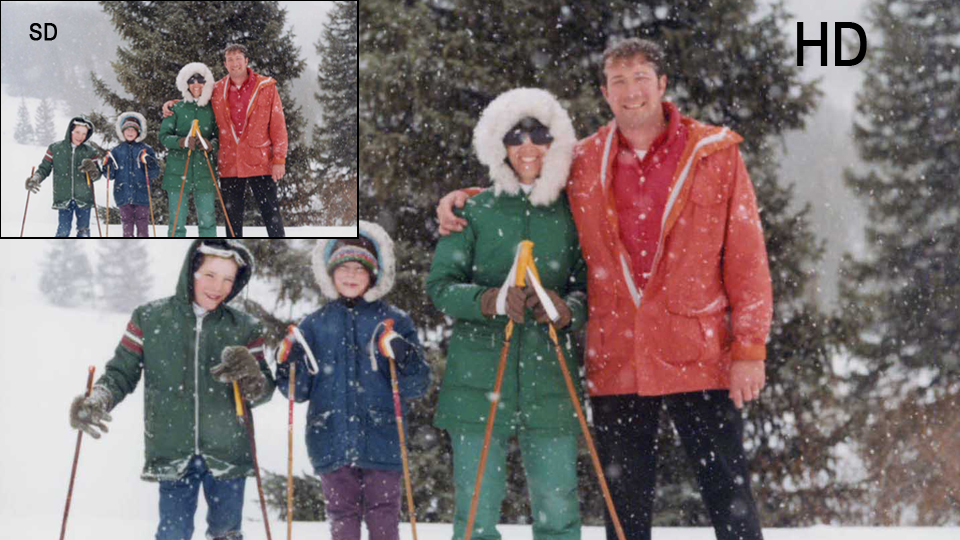
We offer 2K, high-definition (HD) and standard-definition (SD) scanning. Read about why you should consider scanning your film in HD or 2K.
No matter which of our film transfer services you choose, digitizing your old home movies with us ensures your movie film is easy to watch and share, and preserved in a digital format that will last for generations to come.
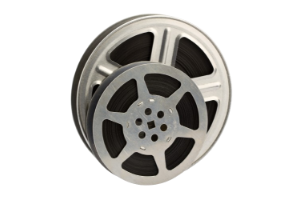
Our Film Digitizing Services
Choose between 2K, HD, or SD capture
Select digital files, playable discs, or any two formats
Edited and unedited options
True Frame-By-Frame Capture
Unlike some services that project your film or use a real-time transfer process, our state-of-the-art equipment digitally scans every frame of your film in SD, HD or 2K resolution, capturing the original footage with zero-flicker, perfect sharpness and vibrant color. The full-quality, uncompressed digital frames are then combined at the right frame rate as a video file, recreating your movies in a way that offers more detail and superior image as compared to processes that don’t image each frame of the original film.
Additional Information
What's Included in our Film Digitizing Service
All film projects include:
- Meeting with you to discuss the details of your project. If you’ve mailed your material, we’ll call you for details.
- Cleaning your film by hand to remove the dust & debris that builds up over time. We also inspect your film & replace old splices as necessary.
- Transferring your film to digital using a true frame-by-frame process.
- Monitoring quality from start to finish to ensure the best possible capture of your original film image.
- Providing either digital MP4 files on your drive or authoring a playable disc(s).
“Files” projects include:
- Providing digital MP4 files that play beginning to end, unedited. The MP4 files we create are high-quality, widely compatible, easy to store and uploadable. We do require a drive to deliver MP4 files. We sell drives or you can provide a drive. We will load any one drive for free. Loading is included when you purchase the drive from us.
“Disc/Edited” projects additionally include:
- Combining up to 2 hours of footage from your reels into an easy-to-watch movie
- Removing the leader and trailer footage from the beginning and end of reels
- Removing blank areas that are 2 seconds or longer
- Placing fade transitions between reels
- Skip ahead marks every five minutes (disc only)
- One original copy of your edited films on disc, or as a digital MP4 file. We do require a drive to deliver MP4 files. We sell drives or you can provide a drive. We will load any one drive for free. Loading is included when you purchase the drive from us.
- A playable disc additionally includes customizing the disc and case label with a photo you provide or a frame shot from your footage, and a title of your choice. View Disc Sample Image
Your original materials are returned to you with your finished project. All film work is done by our professionally trained staff in our local lab.
Note: Digital quality is limited by the quality of your original films. Additional charges may apply for: cleaning, handling or troubleshooting dirty, moldy, damaged or degraded film, etc. Film with adhered dirt and debris, water damage or smoke damage may require wet cleaning for an additional charge. Edited projects include as many discs or MP4 files as footage requires at 2 hours per disc or file. Splitting films to more discs or files than come included adds a set-up of $49.95/additional per additional disc or file. Hard drive sold separately.
Preparing Your Film for Transfer
- Number your reels if there is a specific order you’d like us to maintain.
- For files projects, decide on titles for each reel. Custom naming your MP4 digital video files with up to 10 word filenames is $1.95/file.
- For film reels with multiple scenes, topics or dates, decide whether to purchase separate files for each so that you can easily play just what you want to watch or share select content with friends & family.
- For disc projects, select a title. “Richard’s Family Memories”, “Smith Home Movies: 1964-1975” are a couple of examples.
- Also for disc projects, provide a photo for the cover and disc label. Alternatively, you can elect to allow our editors to select a frame shot from your film.
- If you are purchasing an edited disc or file, decide on options to enhance your movies. For example, you can add a menu to your disc, text in the footage, music, or request editing to improve color, exposure, delete or rearrange footage, etc.
- Think about how many copies you’ll need. We recommend purchasing an archive copy on disc or a drive that can be stored for safekeeping.
- Get started – pick a location to drop off your media and book an appointment, or simply stop by a location that accepts walk-ins.
Film Conversion Pricing
Good Standard-Definition | Better High-Definition (Full HD 1080p) | Best 2K | |||||||
Film Type | Files | Disc/ Edited | Both Formats | Files | Discs/ Edited | Both Formats | Files | Discs/ Edited | Both Formats |
Silent Film | $0.30/ft | $0.40/ft | $0.45/ft | $0.50/ft | $0.60/ft | $0.65/ft | $0.70/ft | $0.80/ft | $0.85/ft |
Sound Film | $0.60/ft | $0.70/ft | $0.75/ft | $0.80/ft | $0.90/ft | $0.95/ft | $1.00/ft | $1.10/ft | $1.15/ft |
Volume discounts: 10% off over 1,000′, 20% off over 2000′
Read about why you should consider scanning your film in HD or 2K!
Minimum order: $29.95 Silent Film Files; $99.95 for Disc/Edited, Both and Sound Film ($69.95 Single 50’ Reel)
Drive sold separately. Digital quality is limited by the quality of your original films. Additional charges may apply for: cleaning, handling or troubleshooting dirty, moldy, damaged or degraded film, etc. Film with adhered dirt and debris, water damage or smoke damage may require wet cleaning for an additional charge. Edited projects include as many discs or MP4 files as footage requires at 2 hours per disc or file. Splitting films to more discs or files than come included adds a set-up of $49.95/additional per additional disc or file.
Film Transfer Samples
Additional Services
With our experience and your creativity, the sky’s the limit in creating the production you envision. We can organize, edit or enhance your collection of old films, and offer several options that make it easy to share and preserve your old home movies.
PREVIEW
We offer a range of options to help you view your films before or after digitizing, so you can put your reels in order, identify where to add scene breaks, chapters, or text screens, or give us instructions for editing:
- Preview onsite: Select locations offer a light table and loupe free for use in the lobby. Viewing the start of each reel on a light table can be a handy way to determine film content and put film reels in order before digitizing. We don’t provide film projectors or viewers. Old equipment can scratch and damage the film, and bulbs are expensive or impossible to find & replace.
- In-house preview: Once your films are digitized but before we finalize your project, select locations offer the option to view your films in-store, in our editing software. Our software makes it easy to review your footage in detail with precise timecodes, so you can provide editing instructions for your final project. Disc/Edited conversion price plus $39.95 for the first hour, $19.95/hour thereafter, plus the cost of any editing or enhancements. Please note, an in-house preview does not save you the cost of converting your films.
- The beauty of Both Formats: If you purchase both unedited files and an edited file or disc, you can pick up the unedited digital portion of your project first to conveniently review at home. Then, just send us your detailed instructions for your final, edited project. Conversion price paid up front, plus the cost of any editing or enhancements.
- Need to review an edited project before we finalize it? We can output a low-res version of the footage and post it in the cloud for you to review for correctness. Add $16.95 per file/upload.
ORGANIZE
Organize your home movies by year, event or a system of your choosing. Add text screens, scene breaks or a menu to help viewers find what they want to watch and identify the contents. We offer a range of options to help you better organize your final digital product:
- Custom naming: Customizing your file and/or folder names with content information such as date, event, subject, etc. Computers sort files alphanumerically, so let us help come up with a system that will keep things in order. $1.95/file for 1-10 word short names
- Text Screens: Add a text screen before reels or scenes, or over footage. Disc/Edited conversion price plus $4.95/1-5 words, 6+ words or text over footage $6.95/10 words. Scroll long-format text $90/hour of editing time.
- Scene breaks and track separation: Separate your footage into multiple files, or add scene break markers within an edited MP4 file so you can jump ahead to the start of reels or scenes. Exporting separate scenes with clear, distinct breaks or accurate start/end time codes is $9.95/MP4 export. For scene break markers within an MP4, add $29.95 to the Edited File conversion price plus $1.95/per marker given clear, distinct breaks or accurate start/end time codes. Add $90/hour for us to scroll through footage to determine where to place scene break markers.
- Disc Menu: Add a menu to your disc so you can navigate by chapter to specific footage. Chapters are also listed on the back cover of the disc case (there is no text in the footage). Disc/Edited conversion price plus $19.95 for 1-6 chapters, $4.95/add’l chapter. Add $90/hour for us to find chapter breaks if not at the start of reels. Add a “Press Play” menu screen for $14.95/disc.
- Custom capture of select footage: $90/hour of capture time
EDIT
If you order our Disc/Edited conversion, the price includes editing. We combine your reels into a longer play movie with fade transitions between reels, and delete leaders, trailers, and blank footage to create an easier, more enjoyable watching experience. You can add a Disc/Edited file format within 30 days after an unedited Files purchase, and simply pay the difference between the Files rates per foot and the Both Formats rate per foot.
Above and beyond this editing that comes included, any editing is possible to create the perfect final presentation of your movie film. Did your old film lose its luster over time? Our professional editors can adjust exposure, restore color, and correct film speed issues and fix or remove other imperfections. We can also delete or reorder sections of footage. $90/hour of editing time.
Plan to edit your films yourself? The high-quality digital video files we provide are perfectly suited to “do-it-yourself” editing on your computer.
We offer a range of options to help you view your films before or after digitizing, so you can give us instructions for editing. See the PREVIEW section for options to preview/view your films.
ENHANCE
Enhance your home movie viewing experience by adding music, text, narration and more to any Disc/Edited conversion project:
- Music – Set the mood by adding music your silent movies:
-
- Royalty free music adds a nice, nostalgic effect $19.95/per hr, 1 hour minimum.
- Music you provide (on CD or as MP3 files) $9.95/song.
- Music purchased for you online $12.95/song.
- Sound/Voice Over – Have Grandpa narrate your movies and we’ll synchronize the recording with your footage. $90/hour of editing time.
- Text Screens: Add a text screen before reels or scenes, or over footage. $4.95/1-5 words, 6+ words or text over footage $6.95/10 words. Scroll long-format text $90/hour of editing time.
- Mixed Media Editing – Combine photos or slides with movie footage for a stunning production. See our Photo and Slideshow pages for more information on these services. Scanning cost + $1.95/image, $9.95/video clip. Conversion and slideshow rates may apply.
SHARE
One of the benefits of converting your old film to digital is that you can easily share copies of the disc or file with friends and family.
If you purchased Files or Disc/Edited and chose an MP4 file as the format, an extra copy of your digital MP4 file(s) is just the cost of an additional USB drive. We sell reliable, fast drives starting at $16 per drive including loading your file(s). Drive price depends on file size.
If you would like to provide the drives to store your digital files, we’ll load any one drive for free. For each additional drive that you provide, there is just a small loading fee depending on the amount of data. For projects of up to 16g of data the loading charge is $5.95/drive. Loading fees vary by total file size.
Our custom USB cases make great gifts and keep your drive(s) safe. Each USB case includes a label with a photo or frame shot from your project (or that you provide), and a title of your choice. $14.95/case, $9.95/case with purchase of 2+drives, $6.95/case with purchase of 5+drives
If you put your film to DVD, copies of discs start at $19.95/disc for DVDs and $29.95/disc for HD/2K projects. Ask about our discounts for multiple copies or copies of multiple discs.
If you want to add a Disc or MP4 Files to a previous order of just one format or the other, see our Both Formats pricing above. Within 30 days after purchase of the first format, we can add the second format for just the additional price per foot of the Both Formats rate as if purchased at the same time. After 30 days, individual format pricing would apply.

Why Choose Memories to Digital?
We Treat Your Memories as if They’re Our Own
We founded Memories to Digital in 2003 after our family mailed their family films away and they got lost. We wanted our community to have a local place to convert family memories, one that offered an alternative to faceless mail-away services.
Today, whether you visit a Memories to Digital location, a Memorywise location, or one of our local partner businesses to drop off or pick up, you receive the same great service from the same dedicated local team. We are your media digitization experts.
We do 100% of our work ourselves, in-house, locally. We give you and your memories the personal service, care and attention deserved, and we use the latest technology to provide you with high-quality digital memories.
Safe, Secure, and Nearby
Eliminate the worry of mailing your memories. We’re local, we do all of our work in-house, and we take it seriously to safeguard your media while in our care.
Media Digitization Experts
Put our extensive digitization expertise to work! We don’t sell cameras or print photos–we specialize in converting all of the old media formats into the latest and best digital formats.
Quality You Can Trust
Our 30-day, 100% guarantee says it all. We pride ourselves on delivering the best possible digital replication of your media as ordered, and will work tirelessly to resolve any issues.
Customized Solutions
Meet with a real person and get your project done right. We’re not a cookie-cutter, drop-box operation– we offer a level of personal service and customization others can’t touch.
Testimonials
Just wanted to thank you again for the great job you did on my family’s movies. They were a big hit, especially the first DVD – The Early Years. Mom and Dad both teared up as they told their children and grandchildren about our family’s history.
Oke Johnson
Superior, CO
Thank you – the film transfers look terrific! It cost a little more than I had imagined, but it was well worth it. You did a great job and be sure that I will recommend your work anytime. I already did my first DVD with some of the clips and it just looks great!
Niwot, Colorado
Our Process

1. Contact & Drop Off
When you’re ready to get started, pick a location to drop off your media and book an appointment, or simply stop by a location that accepts walk-ins. During your initial appointment, we will gather the details, determine which services best suit your needs, and provide an estimate of cost and timing. If your appointment is via phone, we will make arrangements for you to drop off your media.

2. We Digitize!

3. Enjoy, Share & Preserve
Common Questions
Q: Why would I want to scan my film in HD or 2K? Isn’t film so old that scanning at a higher resolution won’t help?
A: Here are the reasons to consider capturing your film in 2K or HD instead of SD:
- Film predates pixels and lines of resolution. The image on film is generated when one or more layers of a random pattern of silver halide crystals react to light, and are retained or washed away and replaced by dyes in the developing process.The image detail generated by this process can appear anywhere on the surface of the film.
- The more lines of resolution we scan with, the more of this random placement of image detail is captured and converted to pixels. Standard definition (SD) captures 720×480 pixels of detail, high-definition (HD) captures 1920×1080 pixels of detail, and 2K captures 2560×1440 pixels of detail.
- These days, with HD, 2K and 4K viewing environments – and larger and larger screens – more, smaller pixels is always better because more and smaller pixels provide more detail and a smoother image as the film image is enlarged to a big-screen.
- Sometimes, scanning with more lines captures more of the “grain” of the film, or the crystals that remain on the surface of the film. The grain is more obvious in early, cheaper film stocks that were produced with larger crystals. Especially for some R8, scanning in SD can soften the detail of the grain, providing a more watchable image.
SD can never reproduce the full image detail on a film frame because SD video has a fixed pixel pattern with a density of 720×480 pixels, and the pixels that make up the image are always in the same place from one video frame to the next. But film has a random grain pattern, and the image created by the grains of crystals is in a totally different place from one film frame to the next. These random grains each carry a bit of the detail that make up the complete picture and, at running speed, the random grains overlap each other on the retina of your eye to significantly increase the amount of apparent detail. This is called “accumulative resolution”. If you transfer your 8mm home movies to SD video, even with the very best SD camera, your detail will be limited by the coarse, fixed pixel pattern inherent in SD video. Of course, HD and 2K have a fixed pixel pattern, too, but the number of pixels are so great and the pattern is so insignificant, that HD and 2K are like a fine silk stocking compared to the burlap weave of SD.
Our high definition (HD) film capture offers resolution gains of 667% over a standard definition (SD) capture (more than 6 times better). Our HD capture is not a mere up-conversion from an SD source. Our HD film capture equipment uses a high definition image sensor to take in 5 times the square pixels per frame of film that our SD machine is not capable of picking up. For 8mm films the HD image sensor generates greater than 4000 pixels per inch. Thus, the accumulative resolution effect found in film can be more readily seen in an HD transfer than in an SD transfer.
Q: What type of film formats do we convert?
A: We transfer Regular 8, Super 8 and 16mm film, including silent and sound film, delivering files online, on a flash drive or DVD.
Q: What type of film do I have?
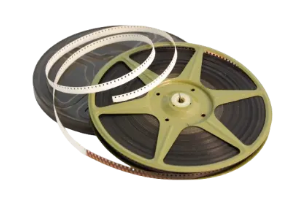
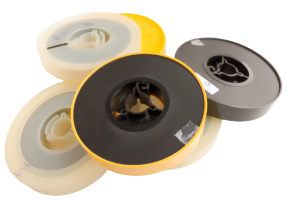
A: Regular 8 film is about a quarter-inch wide, has larger sprocket holes than S8, and is usually on a reel with a quarter-inch center hub. Super 8 film is about a quarter-inch wide, has smaller sprocket holes than R8, and is usually on a reel with a half-inch center hub. 16mm film is a little more than a half-inch wide, has sprocket holes on both sides (no sound), and is usually on a reel with a quarter-inch center hub. To help you identify your type of film, here are some images of the film formats:
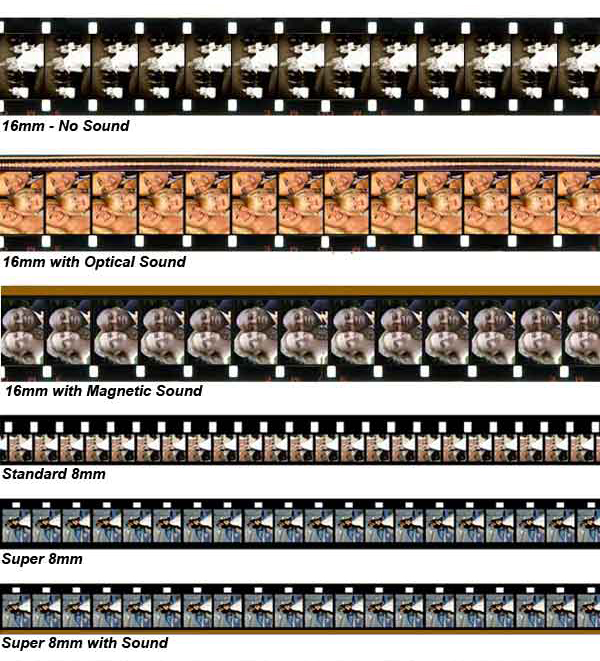
Q: How can I tell if my film has sound?
A: Refer to the image above to identify if your film has audio. Briefly, 16mm film has audio if it only has perforations on one side of the film. For Super8 film, look for a thin, tan-colored strip running alongside the frames. Regular 8mm rarely has sound.
Q: How much film do I have? How many feet of film do I have on my film reels?
A: 3” reels hold 50’ of film, 5” reels hold 200’ and 7” reels hold 400’
Q: Which resolution is best / why choose SD/HD/2K?
A: Old film isn’t like new video, which is made up of small rectangles called pixels. Film is made up of incredibly tiny grains that hold a lot of detail. So even Regular 8 film, which has the smallest image of all film, can benefit from a high definition scan. With screen sizes getting larger and higher in definition, it makes sense to digitize your film with the highest resolution possible. Standard Definition (SD) is the old TV standard and it became obsolete in 1996 as High Definition video was introduced. The SD image has dimensions of 720×480 pixels, while the HD image is 1920×1080 – six times larger than SD! 2K video is even larger with dimensions of 2048×1080. So whenever possible, digitize your film at high definition – after all, you’re probably only going to do this once!
Q: What is the best way to digitize film?
A: We use professional, dedicated film scanners to scan your film frame-by-frame, which gives beautiful, bright, colorful and sharp images, and is by far the best way to convert your film. Those separate images are then processed into a movie file, running at 15 frames-per-second (fps), 16 fps, 18 fps or 24 fps, depending on what type of film you have. We also hand-clean your film first, which brightens it up and allows us to inspect for damage and replace any broken splices, if necessary.
Q: What is the best format to convert to? Is it better to transfer to digital files or DVDs?
A: We almost exclusively transfer media to MP4 files, which are the most compatible file format and easily play on all devices, including TVs. MP4s also maintain excellent video quality in a relatively compact file size. We usually recommend against putting your memories to DVDs, as they only hold SD (low-res) video, and are quickly becoming obsolete. In fact, these days people often bring in their old DVDs to have us transfer them to MP4 files.
Q: How will I receive my digital files?
A: Usually delivering your files online is the most convenient option. We can also load files on a USB thumb drive or an external hard drive. Bring in your own, or you can buy one from us.
Q: Can you convert my film if it’s damaged?
A: Most film remains in good shape for decades. However if your film has suffered some damage or degradation we still may be able to digitize it. We can fix broken splices and can handle curled film to a certain degree. We can also splice together broken sections of film. As long as the film is still flexible and not so brittle that it breaks when handled, and is flat enough for the sensor to read, we will do our best to scan the footage.
Q: When I open my film containers I get a strong vinegar smell. What’s up?
A: If your film smells like vinegar, it’s likely a sign of vinegar syndrome, also known as acetate film base degradation. This degradation makes the film brittle, prone to shrinking, and can cause other physical distortions. Oftentimes, this is due to storage conditions being too warm and humid. Sometimes we can work with this degraded film, but not if it’s too severe.
Q: Can I preview my film first before I have it transferred?
A: We do not offer projector rentals due to the prohibitive maintenance costs associated with them. You can, however, use the light table and loupes provided in each of our stores. This allows you to inspect the first few feet of your film footage, which is usually enough to give you a good indication of the reel’s content. If you feel like you must fully review your film reels first, we recommend eBay where there are many used projectors for sale. Some quality projector brands include Bell & Howell, Chinon, Kodak, Elmo, Eumig, Bauer and Bolex.
Q: How can I tell how old my film is?
A: 16mm film was popular from about 1920 to 1950. Regular 8mm then became most prevalent from 1930 to around 1965, when Super8 film was introduced.
Q: What if my film looks blank?
A: If your film looks very clear and you can’t see an image, it may have been exposed to light before it was processed, in which case there is very little we can do. Similarly, if the film looks very dark, it’s possible that something happened with the camera during filming that didn’t capture the image.
Q: What if my film isn’t on a reel; it’s in a little black shell or case, or it has a dull tan color?
A: More than likely your film hasn’t been processed yet, therefore there’s nothing for us to convert. It needs to be processed first. We can recommend a couple companies that will do that, however it’s expensive and the results are rarely good. The problem is the containers are not perfect and therefore light has leaked in over the years, exposing the film.
Relive Your Memories Through Our Boulder, Denver Metro Film Transfer to Digital Service
Film reels tell a story—of milestones, celebrations, and moments that defined your family’s history. From vintage silent films to treasured home movies with audio, these reels hold memories that deserve to be preserved. Unfortunately, film stock degrades over time, leaving those moments at risk of being lost. That’s where we come in.
At Memories to Digital, we specialize in digitizing old home movies into formats that last a lifetime right here locally in Colorado. We are opening locations up and down the Front Range Urban Corridor and through the I-70 Mountain Corridor. Whether you need to transfer your reels to MP4 files for easy sharing or DVDs for folks who still primarily watch movies on a DVD player, we ensure every frame is captured with care. Using state-of-the-art motion picture film scanners, our process to digitize film is designed to handle everything from R8 and S8 film to 16mm reels, delivering exceptional clarity and preserving even the smallest details.
Film Scanning Services Tailored to You
Not sure what type of film you have? Bring your reels in, and we’ll help you identify whether it’s 8mm, Super 8, or 16mm, and whether it is silent film or is sound film with an audio strip. Our expert staff will measure the footage and guide you on the best options for your collection. With free light table access, you can preview your films before making a decision, saving you the hassle of purchasing a film projector.
For optimal results, we recommend HD or 2K resolution, debunking the myth that older films can’t achieve stunning quality. Our team ensures that the richness of film grain, the rhythmic motion of frames per second, and even the nostalgia of the original projector experience are preserved in digital form.
Why Digitize Now?
As film ages, colors fade, edges curl, and memories slip away. Digitizing your films ensures they’re not only saved but made accessible for future generations. Whether it’s a cherished silent 8mm film or a 16mm documentary, let us help you turn your history into a timeless treasure.
Preserve your past—start your film-to-digital journey today by finding the Boulder or Denver Metro location near you.
Contact Us Today!
Questions? We’re Here to Help! Fill out the form, give us a call or stop by a location near you.
By providing your phone number and submitting the form, you agree to receive Customer Care related texts via SMS from Memories to Digital and MemoryWise. Message frequency may vary. Standard Message and Data Rates may apply. Reply STOP to opt out. Reply HELP for help. Consent is not a condition of purchase. Privacy policy: Your mobile information will not be sold or shared with third parties for promotional or marketing purposes. See more here.