


Our MicroMV Tape Conversion Services
MICROMV
It’s time for home video night! Bring us your MicroMV tapes from through the years and we’ll transfer your MicroMV to digital files or put your MicroMV video to DVD so you can easily enjoy the memories.
Our full quality MicroMV conversion service ensures you’ll get the best possible capture of your original MicroMV in a lasting, easy-to-watch format. We have extensive experience with all types of MicroMV video. Our professional MicroMV equipment and state-of-the-art software optimize color, brightness, tracking, image resolution, frame rate, aspect ratio and audio-to-video synchronization, while minimizing distortion.
Once we convert your MicroMV tapes to digital, you can easily watch, edit, upload and share your videos on any device. Need help editing? We offer video editing along with our MicroMV transfer service.
No matter which options you choose, digitizing your MicroMV with us ensures all of your family videos will be ready to enjoy and share, preserved in a digital format for generations to come.
Convert MicroMV Tapes to Digital with Memories to Digital
Full quality video conversion
Select digital files, playable discs, or both formats
Unedited or edited options
At Memories to Digital, we are experts at getting the best possible results from aging videotapes and DVDs. Depending on how they are stored, magnetic tapes begin to show signs of degradation after 10-30 years. It’s a natural process–the magnetic signal dissipates, the binding disintegrates, and tape deforms. Similarly, disc surfaces chemically deteriorate. With over 20 years of experience, we know how to change our equipment and approach to best read the AV signals and minimize quality loss due to degradation.
Additional Information
What's Included in our MicroMV Transfer Service
All video projects include:
- Meeting with you to discuss the details of your project. If you’ve mailed your material, we’ll call you for details.
- Capturing and converting your video footage using state-of-the-art video transfer equipment and software. This process includes:
- Digitizing your video footage at full original resolution beginning to end, unedited
- Optimizing color, brightness and tracking
- Ensuring audio-to-video synchronization
- Converting your videos at the correct frame rate and aspect ratio
- Monitoring quality from start to finish to ensure the best possible capture of your original video footage.
- Providing either digital MP4 video files on your drive or on a playable disc(s).
“Files” projects include:
- Providing digital MP4 video files that play beginning to end, unedited. The MP4 files we create are high-quality, widely compatible, easy to store and uploadable. We do require a drive to deliver MP4 files. We sell drives or you can provide a drive. We will load any one drive for free. Loading is included when you purchase the drive from us.
Playable DVD or disc projects include:
- Combining up to 2 hours of footage from your tapes beginning to end, unedited
- Fade transitions between tapes if combined
- Skip ahead marks every five minutes
- Customizing the disc and case label with a photo you provide or a frame shot from your footage, and a title of your choice. View Disc Sample Image
- One original copy of your project on disc
Your originals are returned to you with your finished project. All video work is done by our professionally trained staff in our local lab.
Note: Digital quality is limited by the quality of your original videos. Additional charges may apply for: cleaning, handling or troubleshooting dirty, moldy, damaged or degraded media, tape repair ($90/hour, $29.95/repair minimum), finalizing MiniDVDs ($5.95/disc), downloading DV files or if your DV files need to be rotated, ordered or edited, etc. Discs and edited MP4 files are limited to 2 hours per disc or file maximum, footage over 2 hours requires purchasing an additional disc or file. Hard drive sold separately.
Preparing Your MicroMV Tapes for Transfer
- Number your videos if there is a specific order you’d like us to maintain.
- For files projects, decide on titles for each videotape. Custom naming your MP4 digital video files with up to 10 word filenames is $1.95/file.
- For videotapes with multiple scenes, topics or dates, decide whether to purchase separate files for each so that you can easily play just what you want to watch or share select content with friends & family.
- For disc projects, select a title. “Richard’s Family Memories”, “Smith Home Videos: 1964-1975” are a couple of examples.
- Also for disc projects, provide a photo for the cover and disc label. Alternatively, you can elect to allow our editors to select a frame shot from your video footage.
- If you are purchasing an edited disc or file, decide on options to enhance your videos. For example, you can add a menu to your disc, text in the footage, music, or request editing to improve color, exposure, delete or rearrange footage, etc.
- Think about how many copies you’ll need. We recommend purchasing an archive copy on disc or a drive that can be stored for safekeeping.
- Get started – pick a location to drop off your media and book an appointment, or simply stop by a location that accepts walk-ins.
MicroMV Conversion Pricing
Common Home Formats
MicroMV
Good (DVD) | Better (Files) | Best (Both Formats) | |
First tape or set of DV files to DVD (up to 2 hours of footage) | $59.95/DVD | X | $59.95/DVD |
Add more tapes to the same DVD (up to 2 hours of footage) | $24.95/tape 2+ = $19.95/tape | X | $19.95/tape |
Each tape to Unedited MP4(s) | X | $29.95/hr of footage, prorated 1hr minimum/tape | $19.95/hr of footage, prorated 1hr minimum/tape |
Volume discounts: 10% off over 10 hours of footage to digital files (hourly rate only)
10% off over 5 DVDs
Want edited MP4s? Add $10.00/hour of footage with a 1hr minimum per tape. Includes up to 5 min of editing per tape, additional editing $90/hr
Minimum order: $39.95 Single Tape to Unedited MP4 File, $59.95 Single Tape to Edited MP4
Drive sold separately. Additional charges may apply for checking tapes for duplicate footage or TV footage, verifying media is unrecorded (blank), finalizing MiniDVDs ($5.95/disc), cleaning, handling or troubleshooting dirty, moldy, damaged or degraded media, rotating, ordering or editing files, etc. Digital quality is limited by the quality of your original videos.
Why You Should Digitize Your Home Videos
Additional Services
With our experience and your creativity, the sky’s the limit in creating the production you envision. We can organize, edit or enhance your collection of old videos, and offer several options that make it easy to share and preserve your old home videos.
PREVIEW
We offer a range of options to help you view your videotape footage before or after digitizing, so you can put your videos in order, identify where to add scene breaks, chapters, or text screens, or give us instructions for editing:
- Preview onsite: Select locations offer a VCR free for use in the lobby for previewing VHS and VHS-C tapes. Camcorders and other players may be available in the lobby for previewing other types of tapes. If cameras are available in the lobby, they are free to use, if we need to pull a camera off our deck or provide access to other equipment that is not in the lobby, the rate is $14.95/hour of camera use.
- In-house preview: Once your videos are digitized but before we finalize your project, select locations offer the option to view your video footage in-store, in our editing software. Our software makes it easy to review your footage in detail with precise timecodes, so you can provide editing instructions for your final project. Disc/Edited conversion price plus $39.95 for the first hour, $19.95/hour thereafter, plus the cost of any editing or enhancements. Please note, an in-house preview does not save you the cost of converting your videos.
- The beauty of both: If you purchase both unedited files and an edited file or disc, you can pick up the unedited files portion of your project first to conveniently review at home. Then, just send us your detailed instructions for your final, edited project. Conversion price paid up front, plus the cost of any editing or enhancements.
- Need to review an edited project before we finalize it? We can output a low-res version of the footage and post it in the cloud for you to review for correctness. Add $16.95 per file/upload.
ORGANIZE
Organize your home videos by year, event or a system of your choosing. Add text screens, scene breaks or a menu to help viewers find what they want to watch and identify the contents. We offer a range of options to help you better organize your final digital product:
- Custom naming: Customizing your file and/or folder names with content information such as date, event, subject, etc. Computers sort files alphanumerically, so let us help come up with a system that will keep things in order. $1.95/file for 1-10 word short names
- Text Screens: Add a text screen before reels or scenes, or over footage. Disc/Edited conversion price plus $4.95/1-5 words, 6+ words or text over footage $6.95/10 words.. Scroll long-format text $90/hour of editing time.
- Scene breaks and track separation: Separate your footage into multiple files, or add scene break markers within an edited MP4 file so you can jump ahead to the start of tapes or scenes. Exporting separate scenes from a previously purchased unedited or edited MP4, with clear, distinct breaks or accurate start/end time codes, is $9.95/MP4 file. For scene break markers within an MP4, add $29.95 to the Edited File conversion price plus $1.95/per marker for scenes with clear, distinct breaks or accurate start/end time codes. Add $90/hour for us to scroll through footage to determine where to place scene break markers.
- Disc Menu: Add a menu to your disc so you can navigate by chapter to specific footage. Chapters are also listed on the back cover of the disc case (there is no text in the footage). Disc conversion price plus $19.95 for 1-6 chapters, $4.95/add’l chapter. Add $90/hour for us to find chapter breaks if not at the start of reels. “Press Play” menu screen $14.95/disc.
- Custom capture of select footage: $90/hour of capture time
EDIT
If you order Edited files, the price includes 5 minutes of editing. Above and beyond this editing that comes included, any editing is possible for DVD and edited file projects to create the perfect final presentation of your videos. Did your old videotape lose its luster over time? Our professional editors can adjust exposure, restore color, and fix or remove other imperfections. We can also delete or reorder sections of footage. $90/hour of editing time.
Add an edited MP4 file within 30 days after an unedited Files purchase, and get 40% off the edited MP4 pricing.
Plan to edit your video yourself? The high-quality digital video files we provide are perfectly suited to “do-it-yourself” editing on your computer.
We offer a range of options to help you view your videos before or after digitizing, so you can give us instructions for editing. See the PREVIEW section for options to preview/view your videotapes.
ENHANCE
Enhance your video viewing experience by adding music, text, narration and more to any Disc/Edited conversion project:
- Music – Set the mood by adding music your silent videos (usually silent home movies previously transferred to videotape):
- Royalty free music adds a nice, nostalgic effect $19.95/per hr, 1 hour minimum.
- Music you provide (on CD or as MP3 files) $9.95/song.
- Music purchased for you online $12.95/song.
- Sound/Voice Over – Have Grandpa narrate your videos and we’ll synchronize the recording with your footage. $90/hour of editing time.
- Text Screens: Add a text screen before reels or scenes, or over footage. $4.95/1-5 words, 6+ words or text over footage $6.95/10 words. Scroll long-format text $90/hour of editing time.
- Mixed Media Editing – Combine photos or slides with video footage for a stunning production. See our Photo and Slideshow pages for more information on these services. Scanning cost + $1.95/image. Conversion and slideshow rates may apply.
SHARE
One of the benefits of converting your old videotapes to digital is that you can easily share copies of the disc or file with friends and family.
If you purchased Files or Both Formats, an extra copy of your digital MP4 file(s) is just the cost of additional USB drive. We sell reliable, fast drives starting at $16 per drive including loading your file(s). Drive price depends on file size.
If you would like to provide the drives to store your digital files, we’ll load any one drive for free. For each additional drive that you provide, there is just a small loading fee depending on the amount of data. For projects of up to 16g of data the charge is $5.95/drive to load. Loading fees vary by file size.
Our custom USB cases make great gifts and keep your drive(s) safe. Each USB case includes a label with a photo or frame shot from your project (or that you provide), and a title of your choice. $14.95/case, $9.95/case with purchase of 2+drives, $6.95/case with purchase of 5+drives
If you put your video to DVD, copies of discs start at $19.95/disc for DVDs and $29.95/disc for HD projects. Ask about our discounts for multiple copies or copies of multiple discs.
If you want to add a DVD or MP4 files to a previous order of just one format or the other, see Both Formats pricing above. Within 30 days after purchase of the first format, we can add the second format for the discounted Both Formats rate as if purchased at the same time. After 30 days, individual format pricing would apply.

Why Choose Memories to Digital?
We Treat Your Memories as if They’re Our Own
We founded Memories to Digital in 2003 after our family mailed their family films away and they got lost. We wanted our community to have a local place to convert family memories, one that offered an alternative to faceless mail-away services.
Today, whether you visit a Memories to Digital location, a Memorywise location, or one of our local partner businesses to drop off or pick up, you receive the same great service from the same dedicated local team. We are your media digitization experts.
We do 100% of our work ourselves, in-house, locally. We give you and your memories the personal service, care and attention deserved, and we use the latest technology to provide you with high-quality digital memories.
Safe, Secure, and Nearby
Eliminate the worry of mailing your memories. We’re local, we do all of our work in-house, and we take it seriously to safeguard your media while in our care.
Media Digitization Experts
Put our extensive digitization expertise to work! We don’t sell cameras or print photos–we specialize in converting all of the old media formats into the latest and best digital formats.
Quality You Can Trust
Our 30-day, 100% guarantee says it all. We pride ourselves on delivering the best possible digital replication of your media as ordered, and will work tirelessly to resolve any issues.
Customized Solutions
Meet with a real person and get your project done right. We’re not a cookie-cutter, drop-box operation– we offer a level of personal service and customization others can’t touch.
Testimonials
Just wanted to thank you again for the great job you did on my family’s movies. They were a big hit, especially the first DVD – The Early Years. Mom and Dad both teared up as they told their children and grandchildren about our family’s history.
Oke Johnson
Superior, CO
Thank you – the film transfers look terrific! It cost a little more than I had imagined, but it was well worth it. You did a great job and be sure that I will recommend your work anytime. I already did my first DVD with some of the clips and it just looks great!
Niwot, Colorado
Our Process

1. Contact & Drop Off
When you’re ready to get started, pick a location to drop off your media and book an appointment, or simply stop by a location that accepts walk-ins. During your initial appointment, we will gather the details, determine which services best suit your needs, and provide an estimate of cost and timing. If your appointment is via phone, we will make arrangements for you to drop off your media.

2. We Digitize!

3. Enjoy, Share & Preserve
Common Questions
Question goes right here
Your content goes here. Edit or remove this text inline or in the module Content settings. You can also style every aspect of this content in the module Design settings and even apply custom CSS to this text in the module Advanced settings.
Question goes right here
Your content goes here. Edit or remove this text inline or in the module Content settings. You can also style every aspect of this content in the module Design settings and even apply custom CSS to this text in the module Advanced settings.
Question goes right here
Your content goes here. Edit or remove this text inline or in the module Content settings. You can also style every aspect of this content in the module Design settings and even apply custom CSS to this text in the module Advanced settings.
Question goes right here
Your content goes here. Edit or remove this text inline or in the module Content settings. You can also style every aspect of this content in the module Design settings and even apply custom CSS to this text in the module Advanced settings.
Preserve Your MicroMV Tapes with Memories to Digital
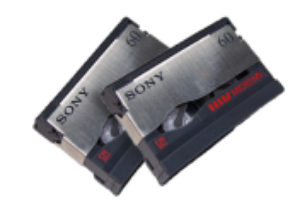
MicroMV was a helical scan digital video tape format introduced in 2001, offering high-quality digital video recording to a very compact magnetic tape cassette. MicroMV is the smallest videotape format and delivers excellent video quality, but it never achieved widespread popularity. It’s important to digitize MicroMV tapes to preserve the footage and make it accessible with today’s technology.
We provide MicroMV tape digitization services, ensuring that your footage is safely converted into modern digital formats like MP4 video files or DVD playable discs. You can easily store your converted MP4 videos on a USB drive or external drive, and view them on any device with a digital video player.
Why Convert MicroMV Tapes to Digital?
MicroMV players are more and more difficult to come by, and as with other magnetic videotape formats, the tapes degrade in quality as they age. By digitizing your MicroMV tapes, you can make sure your precious memories are preserved and easily viewable.
How We Convert MicroMV Tapes
We specialize in converting the digital video recorded on MicroMV tapes to high-quality digital video formats such as MP4 video files and DVDs. Using advanced video converters and state-of-the-art video conversion software, our MicroMV conversion service ensures a seamless transition from digital tape to digital file, preserving the original quality and resolution of your footage while allowing for easy editing, sharing, and viewing on contemporary devices.
Start Converting Your MicroMV Tapes Today
If you have MicroMV tapes containing precious footage, don’t risk losing it to deterioration or technology obsolescence. Convert MicroMV tapes to digital today, ensuring your videos remain accessible and preserved for future generations. Whether you choose MP4, DVD, or both, our professional MicroMV conversion services ensure that your videos are handled with care and expertise.
Contact Us Today!
Questions? We’re Here to Help! Fill out the form, give us a call or stop by a location near you.
By providing your phone number and submitting the form, you agree to receive Customer Care related texts via SMS from Memories to Digital and MemoryWise. Message frequency may vary. Standard Message and Data Rates may apply. Reply STOP to opt out. Reply HELP for help. Consent is not a condition of purchase. Privacy policy: Your mobile information will not be sold or shared with third parties for promotional or marketing purposes. See more here.